

7 October 2026
County Durham and Darlington NHS Foundation Trust (CDDFT) and University Hospitals Tees (UHT) are preparing to introduce a new Laboratory Information Management System (LIMS).
The new system will support how pathology requests and results are managed between our laboratories and GP clinical systems, including EMIS Web and SystmOne.
What GP practices need to do
If your practice makes electronic pathology requests and/or receives pathology results electronically from any of the following laboratories, you will need to make changes within your clinical system:
- County Durham and Darlington NHS Foundation Trust (CDDFT)
- North Tees and Hartlepool NHS Foundation Trust (NTH)
- South Tees Hospitals NHS Foundation Trust (STH)
(The James Cook University Hospital and Friarage Hospital)
It is important that these changes are not only completed, but also successfully tested before the new LIMS goes live.
Every GP practice that electronically orders tests from, or receives results from, our laboratories needs to have completed and tested the required changes before go-live. This testing gives us assurance that results can flow correctly from the new LIMS into GP clinical systems and helps us identify and resolve any issues before the system is introduced.
Required changes
GP practices have been asked to add new laboratory configurations within their clinical systems.
Step 1 – Update your laboratory configuration
Please ensure you have completed the instructions in the relevant guide for your practice:
- TVP EMIS Web – Adding new North Tees and Hartlepool and South Tees labs (2026)
- TVP SystmOne – Adding new North Tees and Hartlepool and South Tees labs (2026)
The guides include step-by-step instructions and screenshots. You only need to add the laboratory/laboratories that you send pathology requests to.
Step 2 – Look out for your test patient result
To confirm that the new pathway is working correctly, the pathology team will send an unsolicited CRP test result to your GP system over the next week. Please look out for the test patient relevant to your area:
North Tees (NT)
Hospital No: T-523879
Surname: Mouse-TestPatient
Forename: Mickey
DOB: 06/10/2010
South Tees (ST)
Hospital No: J706587
Surname: Web
Forename: Emis
DOB: 27/01/1966
Step 3 – Confirm you have received it
Once the CRP result arrives:
- Check that the result has been successfully received in your GP system/mailbox.
- Take a screenshot showing the received result.
- Email the screenshot to [email protected], including your practice name.
If you do not receive the test result, please email [email protected], including your practice name, clinical system and area.
If you require support completing the configuration changes contact the IT helpdesk on 0300 555 0340. Thank you for your continued support.
Go-live update
The new LIMS was previously planned to go live on 12 October 2026. This date has now been postponed.
As we have worked through the final stages of the programme, it has become clear that there is further technical and readiness work we need to complete before we are ready to go live. We have therefore taken the decision to delay the planned go-live.
Taking more time will allow teams to complete the remaining work thoroughly and ensure we move forward safely and with confidence.
Patient safety and experience remain at the heart of this decision. The work completed so far, including testing with GP practices, is helping us identify what still needs to be resolved and providing the evidence we need to make the right decisions about readiness.
A revised go-live date will be communicated as soon as it has been confirmed.
In the meantime, GP practices should continue to complete and test the required configuration changes. Please do not wait for a revised go-live date before completing this work as it is fundamental to the decision to proceed with go-live.
Frequently asked questions
I haven’t received my test result. What should I do?
First, please check that you have completed the required configuration changes in your clinical system (SystmOne or EMIS Web) using the instructions provided.
If you have completed the changes but have not received your test result, please email the WIN3 team at [email protected] so that a repeat test result can be sent.
If you still do not receive the result following the repeat test, please contact NECS/N3i for further support.
How long should a test result take to come through?
Once the test result has been sent, it should appear in your clinical system within a short period of time.
If you have not received the result within a few hours, please contact the WIN3 team so that this can be investigated.
Does my practice need to make these changes?
If your practice makes electronic pathology requests and/or receives pathology results electronically from CDDFT or UHT pathology laboratories, you will need to add the appropriate new laboratory configuration to your clinical system.
If your practice does not request tests from or receive results from these laboratories electronically, the changes may not apply to you.
I’ve made the configuration change. Do I still need to test it?
Yes.
Completing the configuration change is only the first step. We also need GP practices to successfully receive a test result so that we can confirm the new pathway is working correctly.
This testing is an important part of our overall readiness assurance. Every GP practice using our laboratories electronically needs to have completed and successfully tested the required change before the new LIMS goes live.
If you have completed the configuration change but have not yet successfully received a test result, please contact [email protected]
I can now see two laboratory links. Which one should I use?
For your day-to-day pathology requesting, please continue to use the existing laboratory/trading partner configuration until the new LIMS goes live.
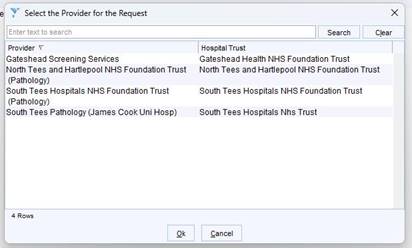
Although you may now be able to see the new laboratory configuration, this has been added in preparation for the change and allow testing and should not yet replace your existing route for routine pathology requests.
We will let GP practices know when the new LIMS is live and when you should begin using the new configuration.
When will the new LIMS go live?
The previously planned go-live date of 12 October 2026 has been postponed.
Further technical and readiness work needs to be completed before the programme is ready to go live safely. A revised date will be communicated once this work has progressed and the programme has the necessary assurance to proceed.
GP practices should continue with configuration and testing now rather than waiting for the revised go-live date.
Why do I need to make the changes now if go-live has been delayed?
The additional time is being used to complete the work and assurance needed for a safe go-live – and GP testing is an important part of that assurance.
We need to know that the new pathway works successfully for practices before the system goes live, rather than discovering problems afterwards.
Completing your configuration and testing now gives us time to identify and resolve any issues and helps ensure practices are ready when the revised go-live date is confirmed.
Need help?
For questions about the LIMS change, testing or repeat test results, please contact the WIN3 Programme Team:
For technical support with your GP clinical system, please contact NECS/N3i through your usual support route.